# Logstash integration guide

[Logstash ](https://www.elastic.co/logstash)serves as a versatile data processing pipeline that ingests, transforms, and forwards logs from various sources to your preferred observability or SIEM tools. With its modular plugin architecture, Logstash enables flexible configuration of inputs, filters, and outputs—making it ideal for adapting log flows to fit evolving infrastructure needs.

This guide demonstrates how to configure a Logstash service running in Docker using Docker Compose to accept HTTP events from Defguard and forward them for further processing or storage.

### Setup Logstash

Save the following config to `logstash.conf` . This will set up http input for Logstash on port 8002 and output the incoming data into stdout.

```
input {
  http {
    port => 8002
    codec => json_lines {
      target => "activity_data"
    }
  }
}
output {
  stdout { codec => rubydebug }
}

```

Add Logstash service to the `docker-compose.yaml` and start it.

```yaml
  logstash:
    image: docker.elastic.co/logstash/logstash:8.14.0
    ports:
      - "8002:8002"
    volumes:
      - ./logstash.conf:/usr/share/logstash/pipeline/logstash.conf:ro
```

### Add Logstash destination

In Defguard UI with an administrator account, go into settings page and choose `Activity log streaming`.

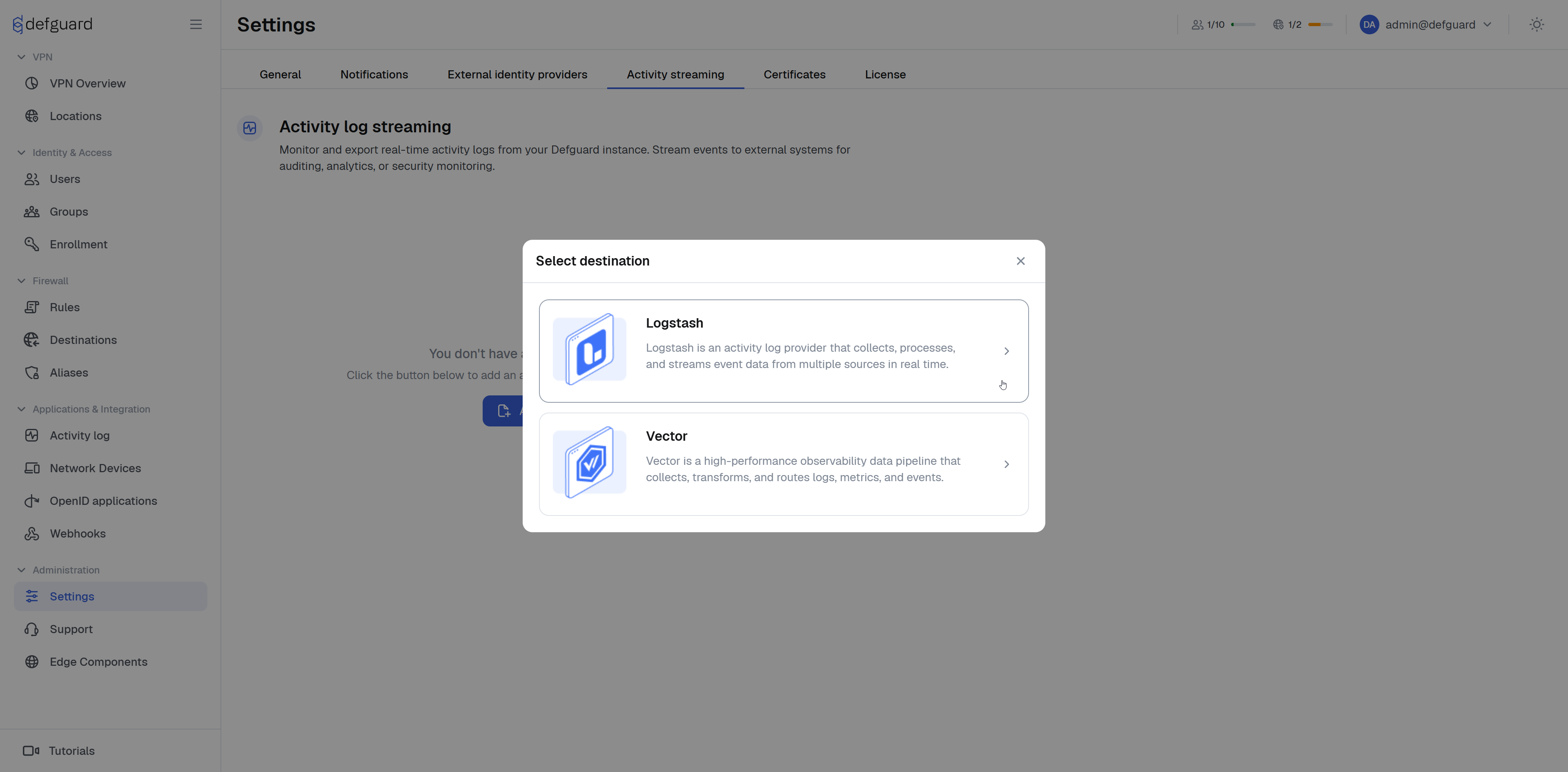
Click `Add new` and choose `Logstash` destination.

<figure><img src="https://3466771104-files.gitbook.io/~/files/v0/b/gitbook-x-prod.appspot.com/o/spaces%2Fe86iamwJVSYnIRsyVEAV%2Fuploads%2Fgit-blob-d2d027e822b9969785939e03eb6ddc6f2b3de185%2Fimage.png?alt=media" alt=""><figcaption></figcaption></figure>

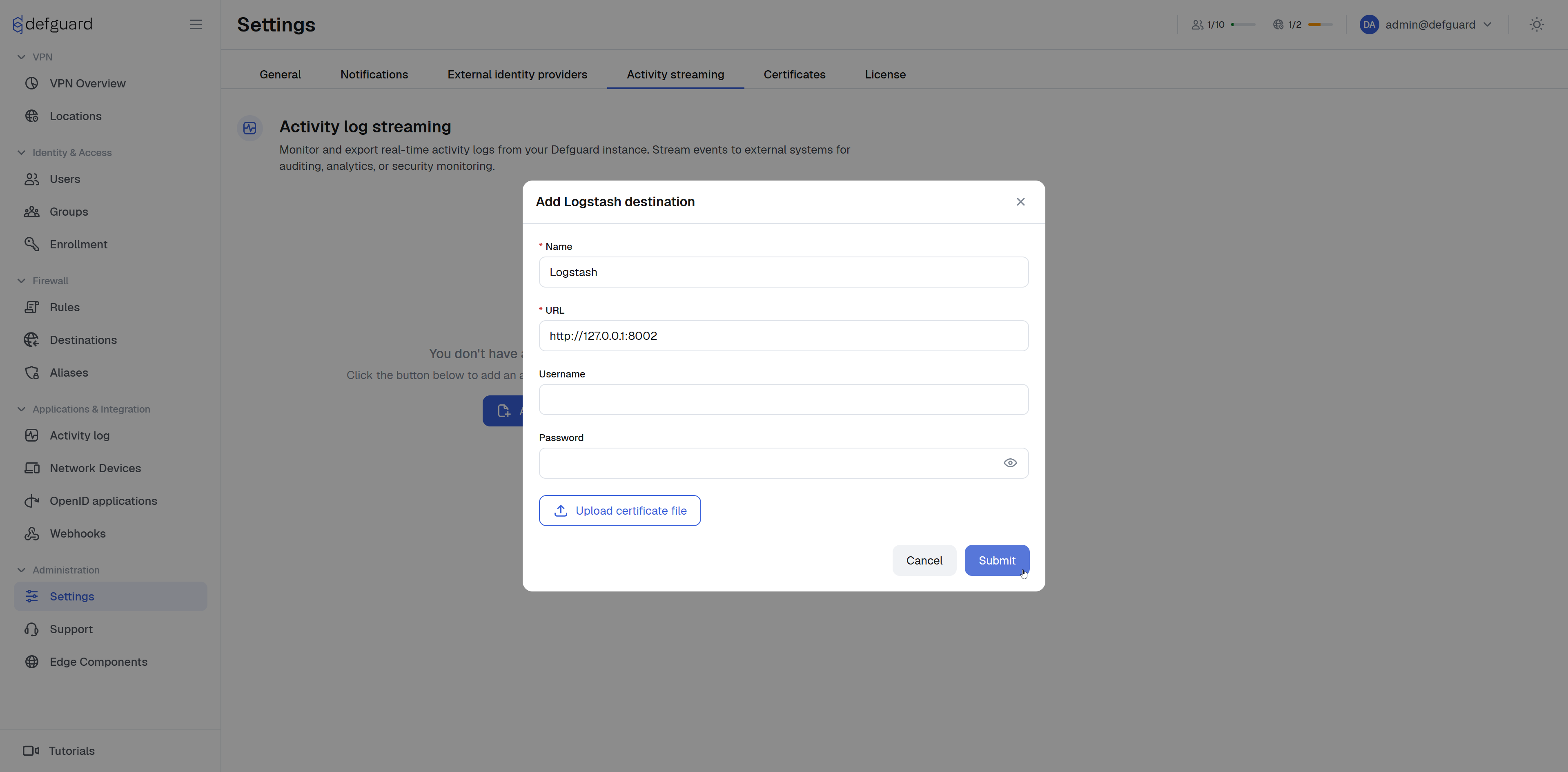
Fill out `Name` and `Url` fields and click **Submit**.

<figure><img src="https://3466771104-files.gitbook.io/~/files/v0/b/gitbook-x-prod.appspot.com/o/spaces%2Fe86iamwJVSYnIRsyVEAV%2Fuploads%2Fgit-blob-56b6ef60ef35b3082d636c3be81f47d3ad292ebf%2Fimage.png?alt=media" alt=""><figcaption></figcaption></figure>

That's it! Defguard should now be sending activity events to Logstash, and you should see them printed to `stdout` in the running Logstash container.

To verify that everything is working, try logging in or out of `defguard` and check if the events appear in the Logstash stdout.

### Basic Authentication

Basic Authentication is a simple HTTP authentication method that includes a username and password in the `Authorization` header of each request.\
To enable Basic Authentication for incoming log data, update your Logstash configuration as follows:

```
input {
  http {
    port => 8002
    codec => json_lines {
      target => "activity_data"
    }
    user => "logstash"
    password => "strongPassword"
  }
}
output {
  stdout { codec => rubydebug }
}

```

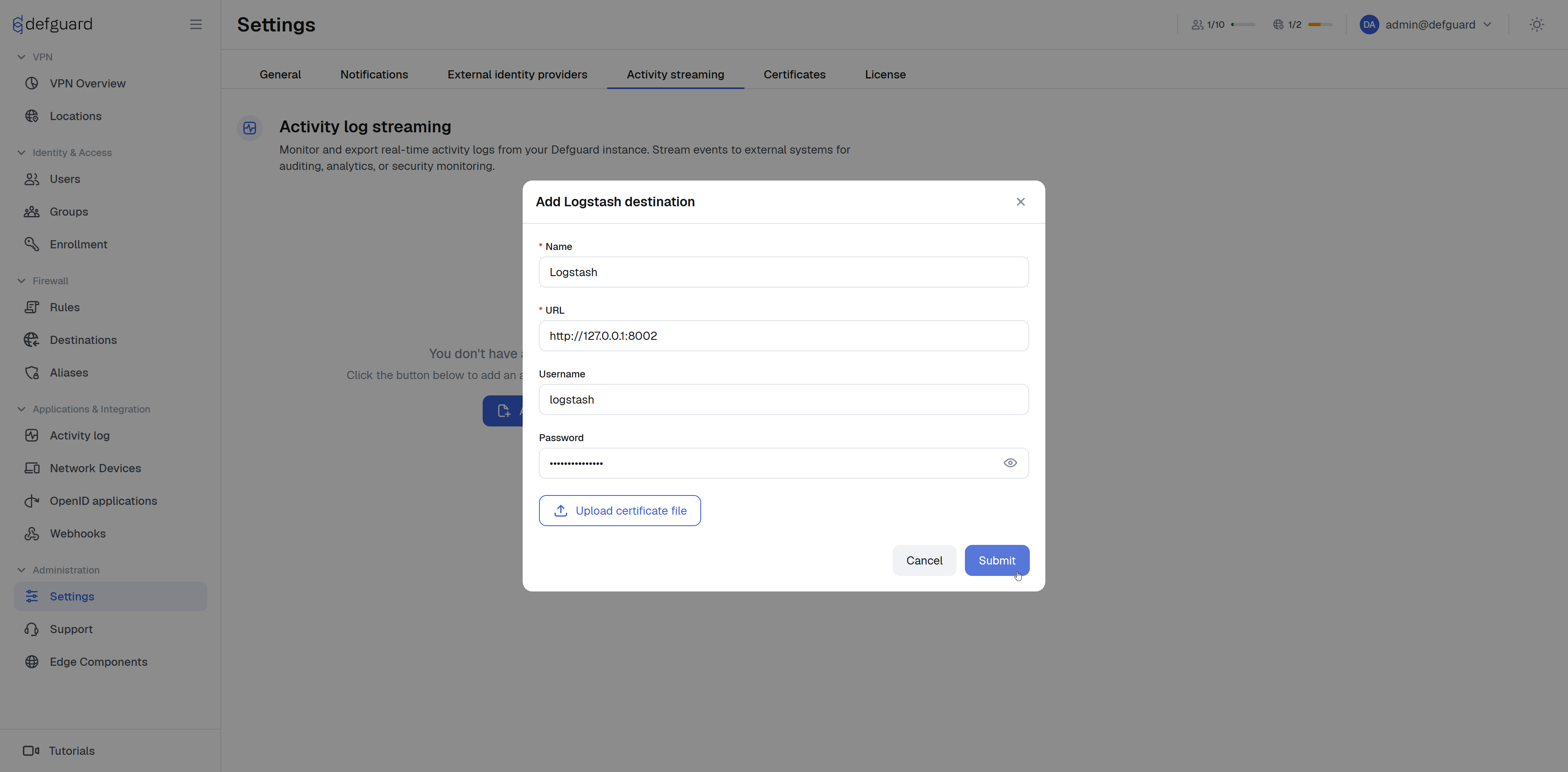
Modify Logstash destination in settings and fill`username` and `password` in settings.

<figure><img src="https://3466771104-files.gitbook.io/~/files/v0/b/gitbook-x-prod.appspot.com/o/spaces%2Fe86iamwJVSYnIRsyVEAV%2Fuploads%2Fgit-blob-710be56387de7a31d998bd76fb8457965e2e620a%2Fimage.png?alt=media" alt=""><figcaption></figcaption></figure>

### Logstash integration configuration

<table data-full-width="true"><thead><tr><th>Name</th><th width="203.7999267578125">Example value</th><th width="111.199951171875" data-type="checkbox">Required</th><th width="230">Logstash related configuration</th><th>Description</th></tr></thead><tbody><tr><td>Name</td><td>Logstash</td><td>true</td><td></td><td>Assigned name for the destination.</td></tr><tr><td>Url</td><td>http(s)://127.0.0.1:8002</td><td>true</td><td><a href="https://www.elastic.co/docs/reference/logstash/plugins/plugins-inputs-http#plugins-inputs-http-host">host</a>, <a href="https://www.elastic.co/docs/reference/logstash/plugins/plugins-inputs-http#plugins-inputs-http-port">port</a></td><td>Address of running logstash HTTP source.</td></tr><tr><td>Username</td><td>logstash</td><td>false</td><td><a href="https://www.elastic.co/docs/reference/logstash/plugins/plugins-inputs-http#plugins-inputs-http-user">user</a></td><td>username for Basic Authentication</td></tr><tr><td>Password</td><td>strongPassword</td><td>false</td><td><a href="https://www.elastic.co/docs/reference/logstash/plugins/plugins-inputs-http#plugins-inputs-http-password">password</a></td><td>password for Basic Authentication</td></tr><tr><td>Cert</td><td>contents of cert.pem</td><td>false</td><td><a href="https://www.elastic.co/docs/reference/logstash/plugins/plugins-inputs-http#plugins-inputs-http-ssl_certificate">ssl_certificate</a></td><td>Used for TLS connection</td></tr></tbody></table>
