# Configuration

This section describes how to configure Defguard deployment as a whole, as well as how to configure each component individually. It covers the settings available for Core, Edge, and Gateway, explains what each component is responsible for, and shows where specific options should be configured.

Defguard configuration is divided into two separate layers:

* deployment parameters
* application settings

**Deployment parameters** cover the startup arguments of each component, such as CLI arguments, environment variables, network bindings, paths, and other options that define how Core, Edge, and Gateway run in a given environment. These options are typically used when deploying the services and are managed outside the Defguard UI.

**Settings**, on the other hand, cover configuration that is managed from within Defguard itself, primarily through the Core web interface. These options are used for operational and product-level configuration once the components are running, such as certificate management, URLs, and other system settings exposed in the Settings page. Together, these two layers define both how Defguard is deployed and how it behaves once deployed.

## Deployment parameters

Deployment parameters define how each Defguard component is started and how it behaves in a particular environment. Every component can be configured using command-line options or environment variables, which makes it possible to adapt to local development, containerized environments, and production infrastructure.

Each command-line option has a corresponding environment variable, so the same configuration can be provided in whichever form best fits your deployment workflow. In addition to CLI arguments and environment variables, Edge and Gateway also support configuration through a TOML file that exposes the same set of options in file-based form. This allows configuration to be managed either directly at startup or through a dedicated configuration file, depending on operational preference.

The following sections describe the supported deployment parameters for each Defguard component. For every option, the documentation lists the command-line flag, the corresponding environment variable, and a short explanation of what that parameter controls.

### Core deployment parameters

* `--log-level` / `DEFGUARD_LOG_LEVEL`: Sets the application log verbosity.
* `--log-file` / `DEFGUARD_LOG_FILE`: Sets the path to a log file.
* `--database-host` / `DEFGUARD_DB_HOST`: PostgreSQL server hostname or address.
* `--database-port` / `DEFGUARD_DB_PORT`: PostgreSQL server port.
* `--database-name` / `DEFGUARD_DB_NAME`: PostgreSQL database name.
* `--database-user` / `DEFGUARD_DB_USER`: PostgreSQL username.
* `--database-password` / `DEFGUARD_DB_PASSWORD`: PostgreSQL password.
* `--http-port` / `DEFGUARD_HTTP_PORT`: Port used by the Core HTTP server.
* `--grpc-port` / `DEFGUARD_GRPC_PORT`: Port used by the Core gRPC server.
* `--grpc-cert` / `DEFGUARD_GRPC_CERT`: Path or value for the gRPC TLS certificate used by Core.
* `--grpc-key` / `DEFGUARD_GRPC_KEY`: Path or value for the gRPC TLS private key used by Core.
* `--proxy-url` / `DEFGUARD_PROXY_URL`: URL/address of the Edge component used by Core.
* `--cookie-domain` / `DEFGUARD_COOKIE_DOMAIN`: Overrides the cookie domain used by Core.
* `--cookie-insecure` / `DEFGUARD_COOKIE_INSECURE`: Controls whether cookies are marked as insecure.
* `--check-period` / `DEFGUARD_CHECK_PERIOD`: Interval for periodic license-related checks.
* `--check-period-no-license` / `DEFGUARD_CHECK_PERIOD_NO_LICENSE`: Interval for checks when no license is present.
* `--check-renewal-window` / `DEFGUARD_CHECK_RENEWAL_WINDOW`: Renewal window used for periodic license checking.
* `--http-bind-address` / `DEFGUARD_HTTP_BIND_ADDRESS`: IP address the Core HTTP server binds to.
* `--grpc-bind-address` / `DEFGUARD_GRPC_BIND_ADDRESS`: IP address the Core gRPC server binds to.
* `--adopt-gateway` / `DEFGUARD_ADOPT_GATEWAY`: Gateway address used to launch the auto-adoption wizard.
* `--adopt-edge` / `DEFGUARD_ADOPT_EDGE`: Edge address used to launch the auto-adoption wizard.

#### Deprecated Core deployment parameters

{% hint style="info" %}
Since Defguard 2.0, much of the configuration that was previously provided through command-line options or environment variables has been moved into Settings. This makes day-to-day administration easier, because system options can now be managed directly from the Defguard UI instead of being tied to service startup parameters. As a result, many configuration changes can be applied and maintained by administrators during runtime without redeploying or manually changing component startup configuration. When deprecated startup parameters are still used during migration, their values are copied into the database so they can subsequently be managed from the UI as regular Settings.
{% endhint %}

* `--secret-key` / `DEFGUARD_SECRET_KEY`: Previously set the application secret key. Use Settings.secret\_key instead.
* `--openid-key` / `DEFGUARD_OPENID_KEY`: Previously provided the OpenID signing key. Defguard now uses an auto-generated OpenID signing key.
* `--hmac` / `DEFGUARD_HMAC`: Temporary compatibility flag for OpenID signing.
* `--url` / `DEFGUARD_URL`: Previously set the Defguard public URL. Use Settings.defguard\_url instead.
* `--disable-stats-purge` / `DEFGUARD_DISABLE_STATS_PURGE`: Previously controlled whether stats purging was disabled. Use Settings.enable\_stats\_purge instead.
* `--stats-purge-frequency` / `DEFGUARD_STATS_PURGE_FREQUENCY`: Previously set how often stats purging runs. Use Settings.stats\_purge\_frequency instead.
* `--stats-purge-threshold` / `DEFGUARD_STATS_PURGE_THRESHOLD`: Previously set how old statistics must be before being purged. Use Settings.stats\_purge\_threshold instead.
* `--enrollment-url` / `DEFGUARD_ENROLLMENT_URL`: Previously set the public Edge URL used for enrollment. Use Settings.public\_proxy\_url instead.
* `--enrollment-token-timeout` / `DEFGUARD_ENROLLMENT_TOKEN_TIMEOUT`: Previously set the enrollment token lifetime. Use Settings.enrollment\_token\_timeout instead.
* `--mfa-code-timeout` / `DEFGUARD_MFA_CODE_TIMEOUT`: Previously set the MFA code lifetime. Use Settings.mfa\_code\_timeout\_seconds instead.
* `--session-timeout` / `DEFGUARD_SESSION_TIMEOUT`: Previously set the session timeout. Use Settings.authentication\_period\_days instead.
* `--password-reset-token-timeout` / `DEFGUARD_PASSWORD_RESET_TOKEN_TIMEOUT`: Previously set the password reset token lifetime. Use Settings.password\_reset\_token\_timeout instead.
* `--enrollment-session-timeout` / `DEFGUARD_ENROLLMENT_SESSION_TIMEOUT`: Previously set the enrollment session timeout. Use Settings.enrollment\_session\_timeout instead.
* `--password-reset-session-timeout` / `DEFGUARD_PASSWORD_RESET_SESSION_TIMEOUT`: Previously set the password reset session timeout. Use Settings.password\_reset\_session\_timeout instead.

### Edge deployment parameters

* `--http-port` / `DEFGUARD_PROXY_HTTP_PORT`: Port used by the Edge HTTP server.
* `--grpc-port` / `DEFGUARD_PROXY_GRPC_PORT`: Port used by the Edge gRPC server.
* `--log-level` / `DEFGUARD_PROXY_LOG_LEVEL`: Sets the Edge log verbosity.
* `--ratelimit-persecond` / `DEFGUARD_PROXY_RATELIMIT_PERSECOND`: Sets the per-second request rate limit for the HTTP API.
* `--ratelimit-burst` / `DEFGUARD_PROXY_RATELIMIT_BURST`: Sets the allowed burst size for rate limiting.
* `--config:` Path `to` a TOML configuration file for Edge.
* `--http-bind-address` / `DEFGUARD_HTTP_BIND_ADDRESS`: IP address the Edge HTTP server binds to.
* `--grpc-bind-address` / `DEFGUARD_GRPC_BIND_ADDRESS`: IP address the Edge gRPC server binds to.
* `--cert-dir` / `DEFGUARD_PROXY_CERT_DIR`: Directory where Edge stores its certificate files.
* `--https-port` / `DEFGUARD_PROXY_HTTPS_PORT`: Port used by the Edge HTTPS server when TLS certificates are installed.
* `--acme-staging` / `DEFGUARD_PROXY_ACME_STAGING`: Enables the Let’s Encrypt staging environment for ACME certificate issuance.

#### Deprecated Edge deployment parameters

* \`--grpc-cert / DEFGUARD\_PROXY\_GRPC\_CERT: Deprecated. gRPC certificates are now automatically generated by the Core CA.
* `--grpc-key` / `DEFGUARD_PROXY_GRPC_KEY`: Deprecated. gRPC certificates are now automatically generated by the Core CA.
* `--url` / `DEFGUARD_PROXY_URL`: Deprecated. The public Edge URL is now generated by Core instead.

### Gateway deployment parameters

* `--log-level` / `DEFGUARD_LOG_LEVEL`: Sets the Gateway log verbosity.
* `--grpc-port` / `DEFGUARD_GRPC_PORT`: Port used by the Gateway gRPC server.
* `--grpc-cert` / `DEFGUARD_GATEWAY_GRPC_CERT`: gRPC TLS certificate used by Gateway.
* `--grpc-key` / `DEFGUARD_GATEWAY_GRPC_KEY`: gRPC TLS private key used by Gateway.
* `--userspace` / `DEFGUARD_USERSPACE`: Enables a userspace WireGuard implementation.
* `--stats-period` / `DEFGUARD_STATS_PERIOD`: Defines how often interface statistics are sent to Defguard Core.
* `--ifname` / `DEFGUARD_IFNAME`: Sets the WireGuard interface name.
* `--pidfile:` Writes `the` Gateway process ID to the specified file.
* `--use-syslog:` Enables `logging` to syslog.
* `--syslog-facility:` Sets `the` syslog facility.
* `--syslog-socket:` Sets `the` syslog socket path.
* `--config:` Path `to` a TOML configuration file for Gateway.

{% hint style="danger" %}
Defguard is built with highest security standards in mind, thus the pre/post options below **accept only a full path to one command and its arguments.**

To run multiple commands, create an appropriate shell script.
{% endhint %}

* `--pre-up` / `PRE_UP`: Command to run before bringing up the interface.
* `--post-up` / `POST_UP`: Command to run after bringing up the interface.
* `--pre-down` / `PRE_DOWN`: Command to run before bringing down the interface.
* `--post-down` / `POST_DOWN`: Command to run after bringing down the interface.
* `--health-port` / `HEALTH_PORT`: Exposes the Gateway health status endpoint on the specified HTTP port.
* `--masquerade` / `DEFGUARD_MASQUERADE`: Enables automatic firewall masquerading.
* `--fw-priority` / `DEFGUARD_FW_PRIORITY`: Sets firewall rule priority.
* `--disable-firewall-management` / `DEFGUARD_DISABLE_FW_MGMT`: Disables automatic firewall management.
* `--http-bind-address` / `DEFGUARD_HTTP_BIND_ADDRESS`: IP address used for the Gateway health endpoint bind.
* `--cert-dir` / `DEFGUARD_GATEWAY_CERT_DIR`: Directory where Gateway stores its certificate files.
* `--adoption-timeout` / `DEFGUARD_ADOPTION_TIMEOUT`: Time limit for the auto-adoption process, in minutes.

### Config file

Edge and Gateway can be configured not only through command-line options and environment variables, but also through a TOML configuration file. This is useful when you want to keep component configuration in a single file instead of passing all parameters at startup.

When using a TOML file, the available keys correspond to the same configuration options exposed by the component through CLI arguments and environment variables. In the TOML file, these options should be written in snake\_case, matching the internal option names used by the component configuration. This makes the file-based configuration equivalent in scope to the startup parameters, while providing a more convenient format for managing persistent configuration. Example Edge configuration parameters:

```toml
# port the API server will listen on
http_port = 8080
# port the gRPC server will listen on
grpc_port = 50051

log_level = "info"
rate_limit_per_second = 0
rate_limit_burst = 0
url = "http://localhost:8080"
acme_staging = false
```

## Settings

This section describes the configuration that is managed from within the Defguard web interface after the system has been deployed. Unlike deployment parameters, which control how individual services are started, Settings are used to manage operational behavior directly from Core and can be updated by administrators through the UI.

This includes:

* instance URLs and public addresses
* certificate and TLS configuration for Core and Edge
* built-in CA management
* branding and general instance information
* OpenID Connect and authentication-related settings
* enrollment and session-related timeouts
* license and enterprise-related settings
* SMTP and email delivery configuration
* webhook configuration
* statistics retention and purge behavior
* API tokens and integration-related settings
* component adoption and setup workflows where managed through the UI

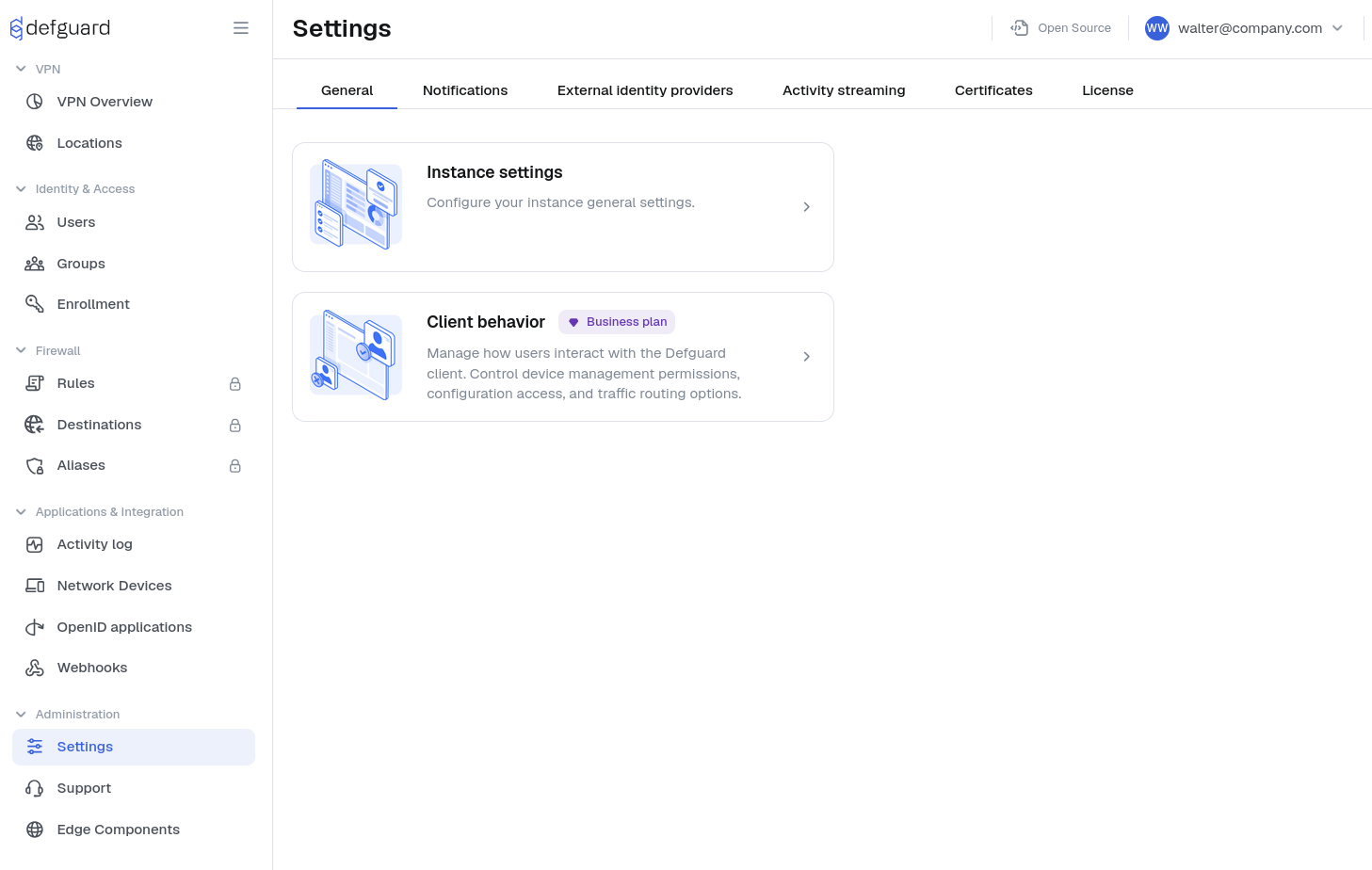
Settings page is accessible only for admin users. It can be accessed with a navigation item in the main menu.

<figure><img src="/files/ZZXkBa6JgwyMk19md7DP" alt=""><figcaption></figcaption></figure>

The page is split into tabs that group related settings:

* General: contains the main instance-level administration pages.
  * Instance settings: configures the Core URL, instance name, public Edge URL, authentication period, statistics retention and purge behavior, and password reset timeouts.
  * Client behavior: configures client-side permissions and policy controls, including device management, self-service client activation, and client traffic-routing policy.
* Notifications: contains outbound notification settings.
  * SMTP: configures the mail server connection used by Defguard, including server address, port, credentials, sender address, and encryption mode.
  * Gateway notifications: configures gateway disconnect and reconnect email notifications, including the inactivity threshold.
* External identity providers: contains integrations for external authentication and directory services.
  * OpenID providers: configures an external OpenID Connect identity provider for login.
  * LDAP: configures LDAP connection settings, user and group mapping, synchronization mode, authority, and remote enrollment options.
* Activity streaming: configures external destinations for activity logs.
  * Log streaming destinations: lets administrators add, edit, and review destinations used for forwarding Defguard activity logs.
* Certificates: contains certificate and trust management for Core and Edge.
  * Certificate authority: manages the built-in Defguard CA.
  * Certificates: configures the certificates used by Core and Edge, including certificate source selection and status review.
* License: contains subscription and licensing information.
  * License key and plan information: shows the current license state, current plan, and lets administrators enter or update the license key.

## YubiBridge configuration

### Environmental variables

* `LOG_LEVEL`: Log messages level, default: `INFO`, available levels: `CRITICAL`, `ERROR`, `WARNING`, `INFO`, `DEBUG`
* `WORKER_ID`: Name of your YubiBridge displayed on Defguard website, default: `YubiBridge`
* `DEFGUARD_TOKEN`: - Secret worker token to secure gRPC communication, available on provisioners page
* `SMARTCARD_RETRIES`: Number of retries in case provisioning failed, default: `1`
* `JOB_INTERVAL`: Defines how often(seconds) YubiBridge checks Defguard for new jobs, default: `2`
* `SMARTCARD_RETRY_INTERVAL`: Defines the number of seconds between trying to provision YubiKey again, default `15`

### CLI arguments:

* `-h` , `--help`: Display help message
* `-g <URL>`, `--grpc <URL>`: Connect to gRPC server at the given URL
* `-i <ID>` , `--id <ID>`: WorkerID, default `YubiBridge`
* `-d` , `--debug`: Enable debug mode
* `-t <TMPDIR>` , `--tmpdir <TMPDIR>`: GnuPG home directory, default: `tmp`
* `-p <first_name> <last_name> <email>` , `--provision <first_name> <last_name> <email>`: Provision YubiKey with the following data
* `-w <token>` , `--worker-token <token>`: Secret worker token to secure gRPC communication, available on provisioners page
* `-c <command>` , `--command <command>`: Run command after provisioning and pass created keys as arguments

### Troubleshooting the configuration <a href="#troubleshooting-the-configuration" id="troubleshooting-the-configuration"></a>

Common configuration issues.

#### Gateway <a href="#gateway" id="gateway"></a>

`Error: Syslog(Initialization(Io(Os { code: 111, kind: ConnectionRefused, message: "Connection refused" })))`

The selected syslog socket may be wrong. See the `syslog_socket` configuration option for the gateway: [#config-file](#config-file "mention"). Set it to a correct syslog socket on your operating system. The default socket is valid for FreeBSD.

#### Core

`Cookie “defguard_session” has been rejected for invalid domain.` (browser console error)

This issue most often takes the form of not being able to login without any obvious cause. The login button doesn't redirect and no relevant error message is displayed in the Defguard Core logs. In this case we recommend checking the browser logs (usually right click > inspect should open the developer tools along with the browser console). If you can see the above error, this means that your `DEFGUARD_URL` configuration option doesn't match the URL you use to access the dashboard at the moment.

For example, if your login screen is at `http://my.domain.com:8000/auth/login` set `DEFGUARD_URL` to `` http://my.domain.com:8000` `` .


---

# Agent Instructions: Querying This Documentation

If you need additional information that is not directly available in this page, you can query the documentation dynamically by asking a question.

Perform an HTTP GET request on the current page URL with the `ask` query parameter:

```
GET https://docs.defguard.net/deployment-strategies/configuration.md?ask=<question>
```

The question should be specific, self-contained, and written in natural language.
The response will contain a direct answer to the question and relevant excerpts and sources from the documentation.

Use this mechanism when the answer is not explicitly present in the current page, you need clarification or additional context, or you want to retrieve related documentation sections.