> For the complete documentation index, see [llms.txt](https://docs.defguard.net/llms.txt). Markdown versions of documentation pages are available by appending `.md` to page URLs; this page is available as [Markdown](https://docs.defguard.net/support-1/sending-support-information/desktop-client.md).

# Desktop Client

In order to provide more detailed information, please do the following:

#### Enable DEBUG logs in the client

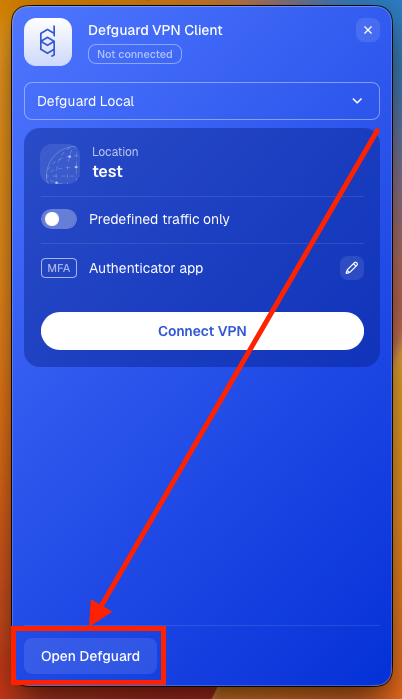
1. If you don't have **Defguard** in full view mode, open **Defguard** from tray view, and click **Open Defguard**

<figure><img src="https://content.gitbook.com/content/pE5yODhpiy5pT1XxY0BS/blobs/gSvbFh6HU6TjHK3rC307/tray-view-open-defguard-marked.png" alt="" width="50%"><figcaption></figcaption></figure>

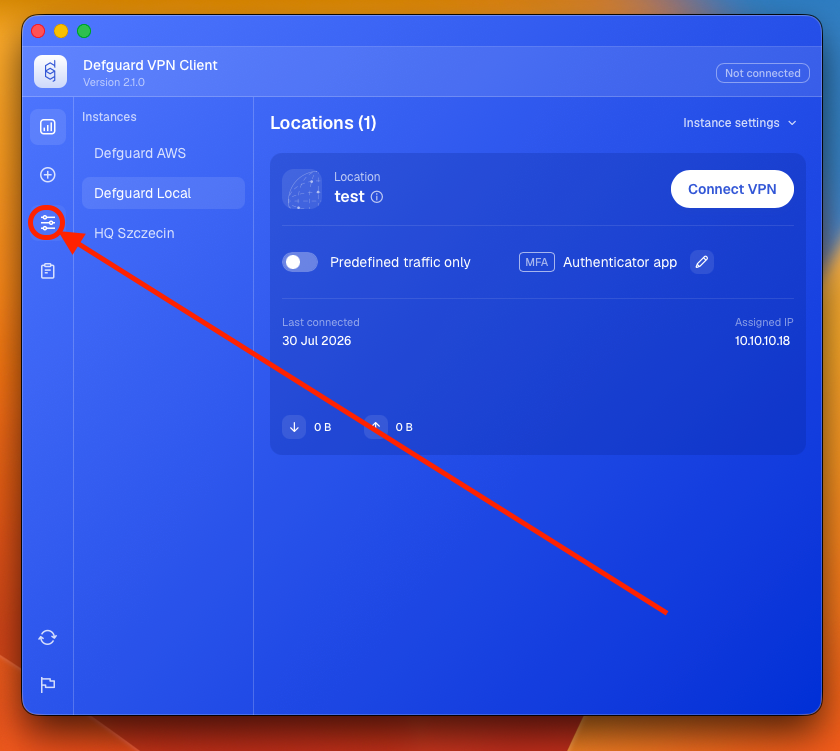
2. Go to settings tab.

<figure><img src="https://content.gitbook.com/content/pE5yODhpiy5pT1XxY0BS/blobs/7wJ4rpER45GUrcr08vYX/settings-tab-full-view.png" alt=""><figcaption></figcaption></figure>

3. Click on currently selected opton in **Logging threshold** section.

<figure><img src="https://1370451937-files.gitbook.io/~/files/v0/b/gitbook-x-prod.appspot.com/o/spaces%2FpE5yODhpiy5pT1XxY0BS%2Fuploads%2Fgit-blob-97367b39d21c0028a901b077a2a830dc006d41bd%2Flogging-threshold-marked.png?alt=media" alt=""><figcaption></figcaption></figure>

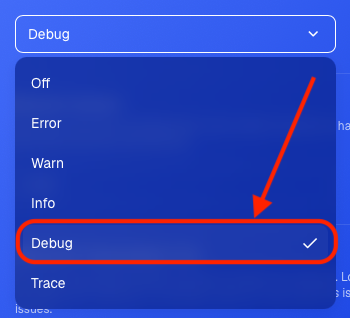
4. Choose `Debug` from list.

<figure><img src="https://content.gitbook.com/content/pE5yODhpiy5pT1XxY0BS/blobs/rAkH6Tn99cTUJlFcLz7K/debug-threshold-marked.png" alt=""><figcaption></figcaption></figure>

#### Gather more logs before sending

Before submitting the logs, after you have changed the logging to debug, please repeat any actions that have caused any problems.

#### Collecting the client logs

1. If you don't have **Defguard** in full view mode, open **Defguard** from tray view, and click **Open Defguard**

<figure><img src="https://content.gitbook.com/content/pE5yODhpiy5pT1XxY0BS/blobs/gSvbFh6HU6TjHK3rC307/tray-view-open-defguard-marked.png" alt="" width="50%"><figcaption></figcaption></figure>

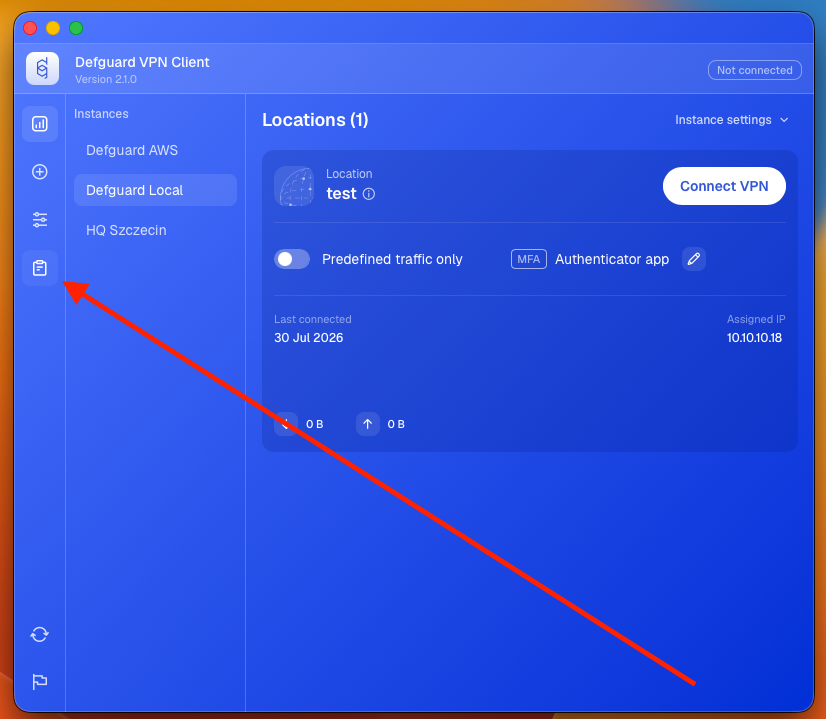
2. Go to Log tab.

<figure><img src="https://content.gitbook.com/content/pE5yODhpiy5pT1XxY0BS/blobs/K2icouwV80sQzF70YNlR/log-tab-marked.png" alt=""><figcaption></figcaption></figure>

3. Click on the filter on the left.

<figure><img src="https://1370451937-files.gitbook.io/~/files/v0/b/gitbook-x-prod.appspot.com/o/spaces%2FpE5yODhpiy5pT1XxY0BS%2Fuploads%2Fgit-blob-ef4518ced6ffe62eb64f0e2f63f3f5e7119b6570%2Flog-range-marked.png?alt=media" alt=""><figcaption></figcaption></figure>

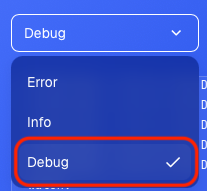
4. Set filter to `Debug`.

<figure><img src="https://content.gitbook.com/content/pE5yODhpiy5pT1XxY0BS/blobs/PBTtIUW32KiB9GzegY2s/debug-option-selected.png" alt=""><figcaption></figcaption></figure>

5. Click on the filter on the right.

<figure><img src="https://1370451937-files.gitbook.io/~/files/v0/b/gitbook-x-prod.appspot.com/o/spaces%2FpE5yODhpiy5pT1XxY0BS%2Fuploads%2Fgit-blob-83da009fa5c7b5667ca3b6b0b20301c81e93e10b%2Fall-option-menu-marked.png?alt=media" alt=""><figcaption></figcaption></figure>

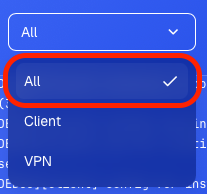
6. Set filter to `All`.

<figure><img src="https://content.gitbook.com/content/pE5yODhpiy5pT1XxY0BS/blobs/EtnNOITNIgUF2o235mCM/all-option-marked.png" alt=""><figcaption></figcaption></figure>

7. Click on actions menu.

<figure><img src="https://1370451937-files.gitbook.io/~/files/v0/b/gitbook-x-prod.appspot.com/o/spaces%2FpE5yODhpiy5pT1XxY0BS%2Fuploads%2Fgit-blob-e14e21a6fb4d00b94946966684a72b94b5d87afc%2Factions-menu-marked.png?alt=media" alt=""><figcaption></figcaption></figure>

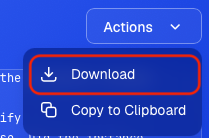
8. Download logs

<figure><img src="https://content.gitbook.com/content/pE5yODhpiy5pT1XxY0BS/blobs/dNdIop8Dj5FIzS1j0eAX/download-actions-menu.png" alt=""><figcaption></figcaption></figure>

9. Save file.