> For the complete documentation index, see [llms.txt](https://docs.defguard.net/llms.txt). Markdown versions of documentation pages are available by appending `.md` to page URLs; this page is available as [Markdown](https://docs.defguard.net/2.2/features/user-management.md).
# User management
The **Users** page lists every account in your Defguard instance. Individual accounts are managed from the menu at the end of each row; this page covers the tools that act on the whole list.
## Filtering by group
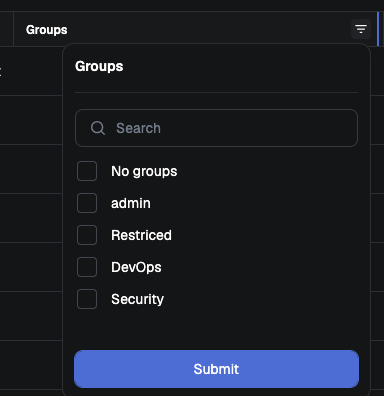
The filter on the **Groups** column lists every group you have defined, plus an extra **No groups** entry matching accounts that belong to no group at all.
Selecting several groups returns users who are in **any** of them, and adding **No groups** widens the result rather than narrowing it.
## Bulk actions
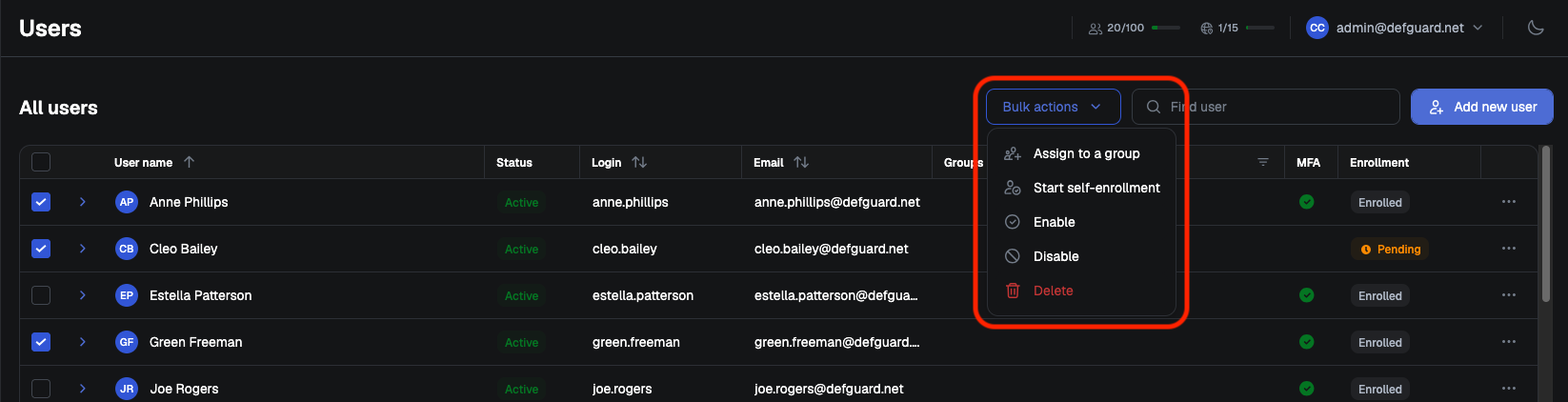
Select accounts with the checkboxes in the rows, then use the **Bulk actions** menu:
* **Assign to a group**
* **Start self-enrollment** - begins [enrollment](/2.2/features/remote-user-enrollment.md) and sends each user an enrollment email
* **Disable**
* **Enable**
* **Delete**
Each action asks for confirmation and states how many accounts it will affect.
{% hint style="warning" %}
**Start self-enrollment** requires [SMTP to be configured](/2.2/features/notifications/setting-up-smtp-for-email-notifications.md).
{% endhint %}
{% hint style="danger" %}
Deleting accounts cannot be undone.
{% endhint %}